
SPINDEX Installation & Registration Guide
Open the App Store / Google Play Store on your phone and search for “SPINDEX RATINGS.”

Find SPINDEX RATINGS and download/install the app.
Once the installation is complete, open the SPINDEX RATINGS app.

Follow the instructions and keep tapping “NEXT” until you reach “Get Started.” Then select “Sign Up.”

Enter your email address and tap “CONTINUE.”

A 6-digit verification code will be sent to the email address you entered. Enter the code and tap “Create Account.”

Enter your full name, date of birth, and gender as required, then tap “CONTINUE.”

You will be asked whether you have a Ratings Central rating:
If you have a Ratings Central rating, select “YES” and continue to the next step.
If you do not have a Ratings Central rating, you can stop here. Please come to Top Spins Table Tennis Club before 22 November for an in-person rating assessment.

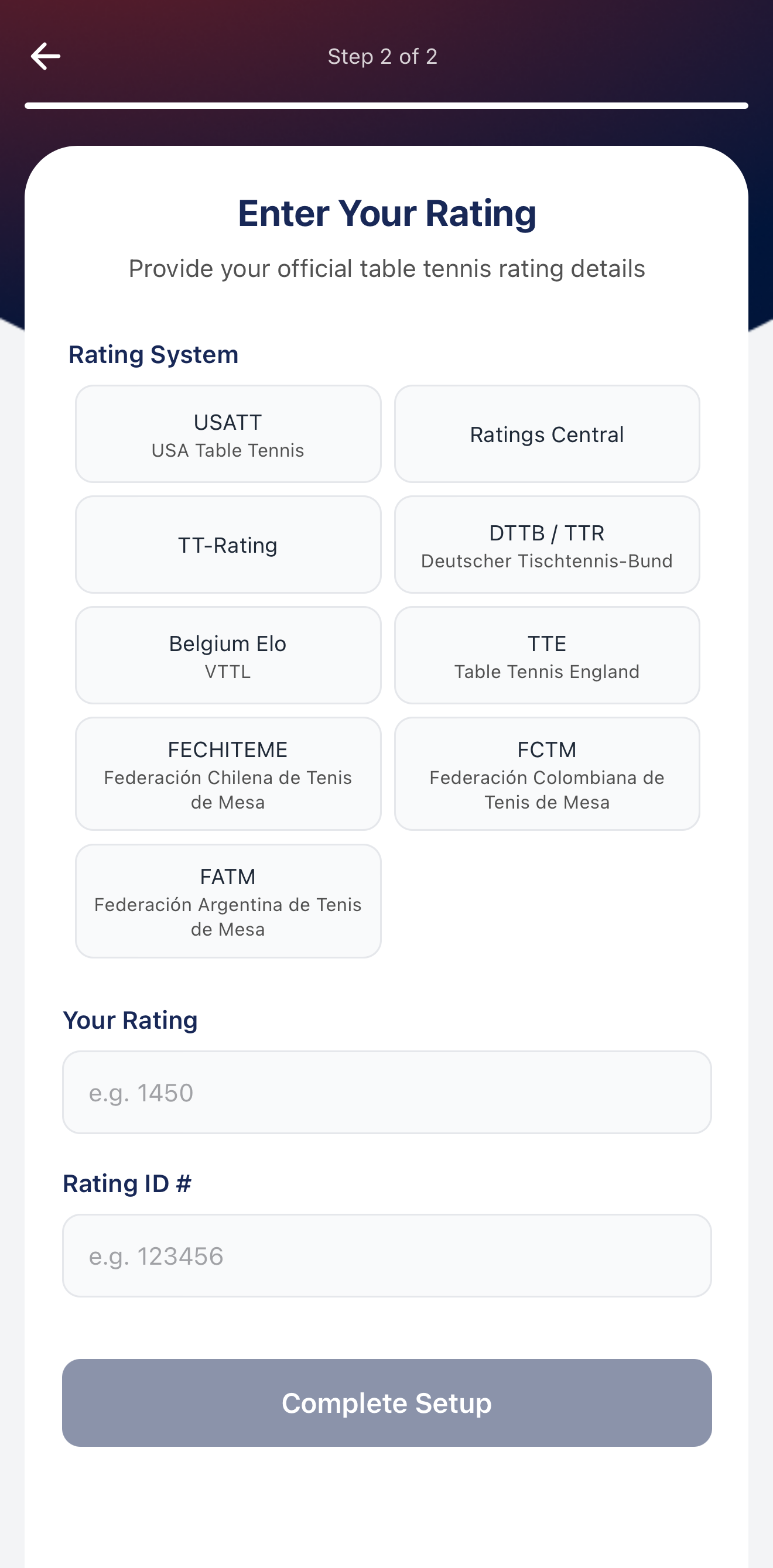
If you selected “YES”:
Select “Ratings Central” from the options.
Enter your current Ratings Central rating + 100 points.
For example, if your Ratings Central rating is 850, please enter 950.
Enter your Ratings Central ID.
Once all information is correct, tap “COMPLETE SETUP” to complete your SPINDEX registration and setup.


Comments